Payment OS

One platform for authorized payment institutions in Türkiye.

Exclusively for authorized payment institutions in Türkiye: unify POS channels, gateway, ledger, partner management, approvals and reconciliation.

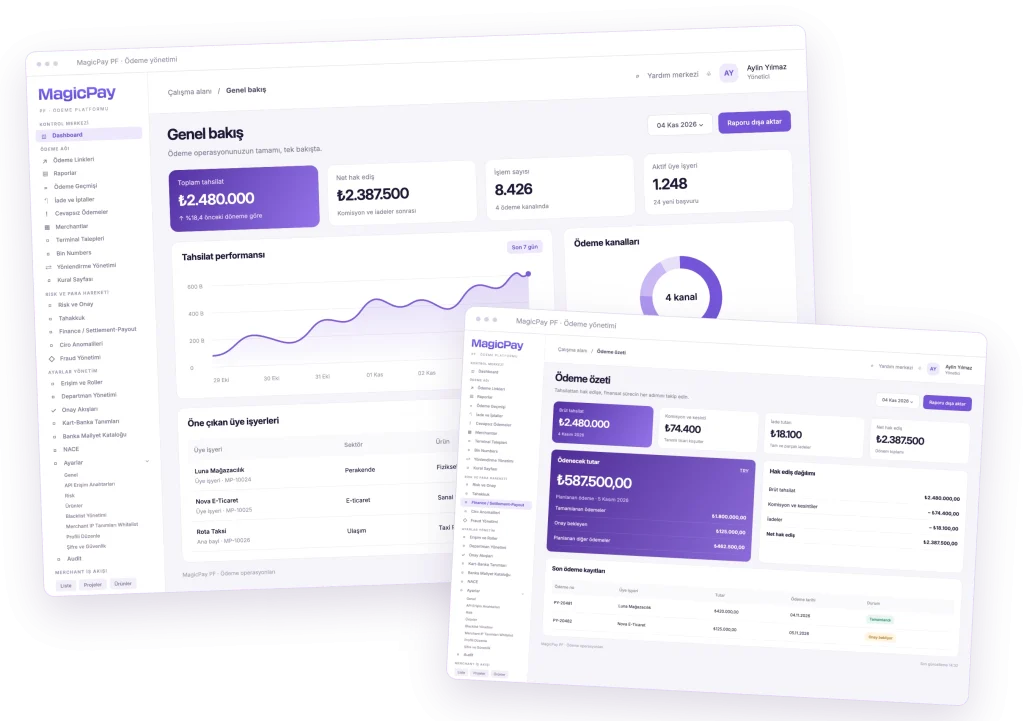
Payment OS workspace
Promotional composition of overview and payout summary panels.
Images show Turkish promotional interfaces and sample data.

Every payment acceptance channel

Bring physical POS, virtual POS, Soft POS and Taxi POS transactions into one operational framework.
Connected financial records

Track every movement in the ledger, from sales, commissions and refunds to merchant settlement and payouts.

A controlled partner network

Manage agents, integrators and dealers with role-based access and multi-approver workflows.

End-to-end payment operations

MagicPay Payment OS is end-to-end operational infrastructure offered exclusively to authorized payment institutions (PFs) in Türkiye, subject to CBRT/TCMB regulation and supervision under Law No. 6493 and MASAK obligations. Manage your merchant network through POS channels, a central payment gateway, ledger, approvals and reconciliation in one platform. Stores, e-commerce businesses, taxis, dealers and integrators form part of your institution’s service network. Your institution manages its portfolio centrally, while finance, risk and operations teams work with records relevant to their responsibilities.

Physical POS: payment acceptance across stores and branches

Manage card payments across your institution's merchant network at stores, branches and service locations by merchant and terminal. Monitor sales from multiple POS devices centrally and see the complete financial record, from the gross transaction amount to deductions and the net payout.

  • Set up and manage terminals linked to each merchant
  • Track sales, dates and transaction statuses by terminal and dealer
  • View commissions, deductions and net payout details
  • Track voids and refunds against the original sale

Virtual POS: a consistent payment flow across digital channels

Bring payment initiation, 3D Secure authentication and outcome tracking together for websites and digital sales channels served by your institution. Payment OS connects each merchant's configured bank and payment provider integrations to the checkout experience. Merchants in your institution's network can track outcomes through the dashboard or their integration within their assigned access scope.

  • Accept card payments and manage 3D Secure flows across digital channels
  • Offer installment options according to the bank and product
  • Track successful, failed and pending transactions
  • Link void and refund records to payment details

Soft POS: support mobile acceptance across your merchant network

Enable field teams and mobile businesses in your institution's merchant network to accept card payments using Soft POS on compatible devices. Associate the mobile payment channel with each merchant's products and monitor field transactions alongside other payments in the same operational view.

  • Accept payments on compatible mobile devices
  • Manage Soft POS access by merchant
  • Track mobile payments in transaction history
  • Define commissions and usage terms by product

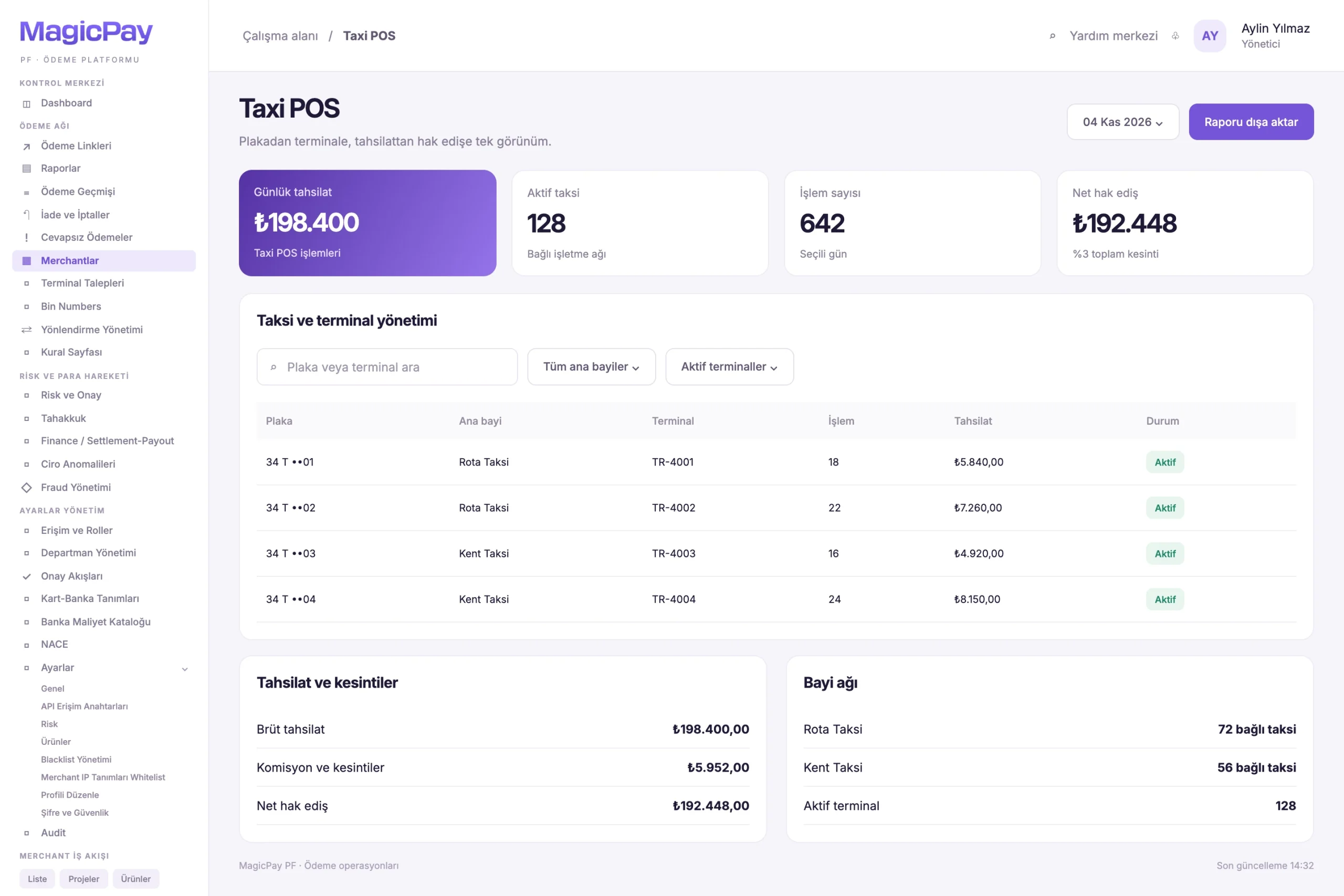
Taxi POS: vehicle registration, terminal and settlement in one record

Manage taxi payments within your institution's network through linked vehicle registrations, terminals, merchants and sub-dealers. Review sales through the relevant records, from a single taxi's daily transactions to an extensive taxi network. Track both the amount payable after deductions and the status of payouts to bank accounts.

  • Maintain taxi and sub-dealer records
  • Manage links between vehicle registrations and terminals
  • List and filter taxi transactions
  • Track commissions, deductions, settlement amounts and payouts
Sample taxi table with license plate, main dealer, terminal and collections columns. Open full-size image
Taxi POS and terminal managementTaxi, terminal and settlement relationships with illustrative records.

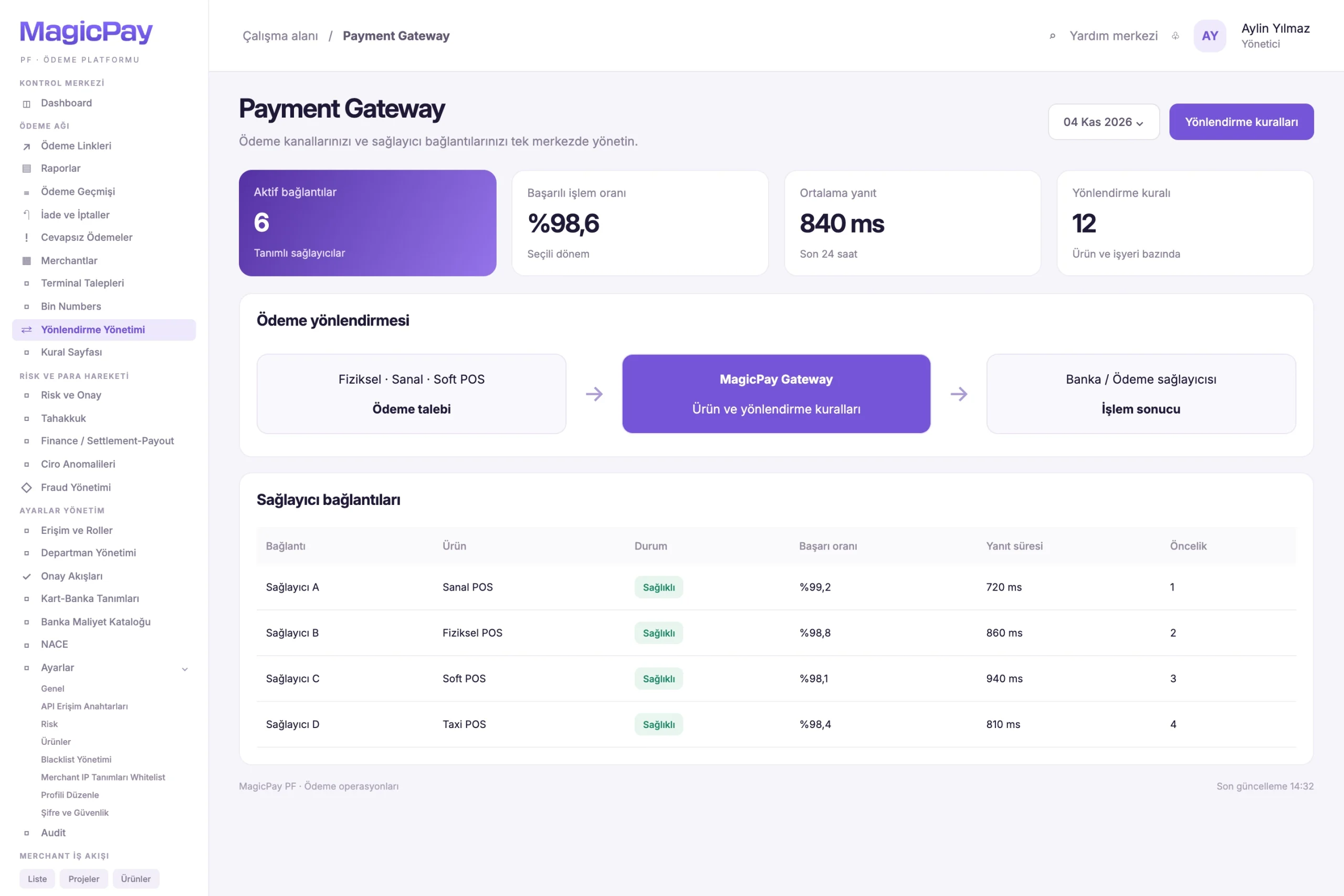
Payment Gateway: central access to banks and payment providers

Connect to different banks and payment providers through a common API structure. The Payment OS gateway routes payment requests to the relevant provider according to the merchant's products and configured routing rules. Track payment initiation, authentication, status queries, voids and refunds around the same transaction reference.

  • Integrate with multiple banks and payment providers
  • Route requests by merchant and product scope
  • Centrally track 3D Secure flows, payment outcomes and provider responses
  • Link voids and refunds to the original transaction and provider
Promotional interface with a payment routing diagram and provider connections table. Open full-size image
Payment gateway and routingIllustrative view of channel, gateway and provider relationships.

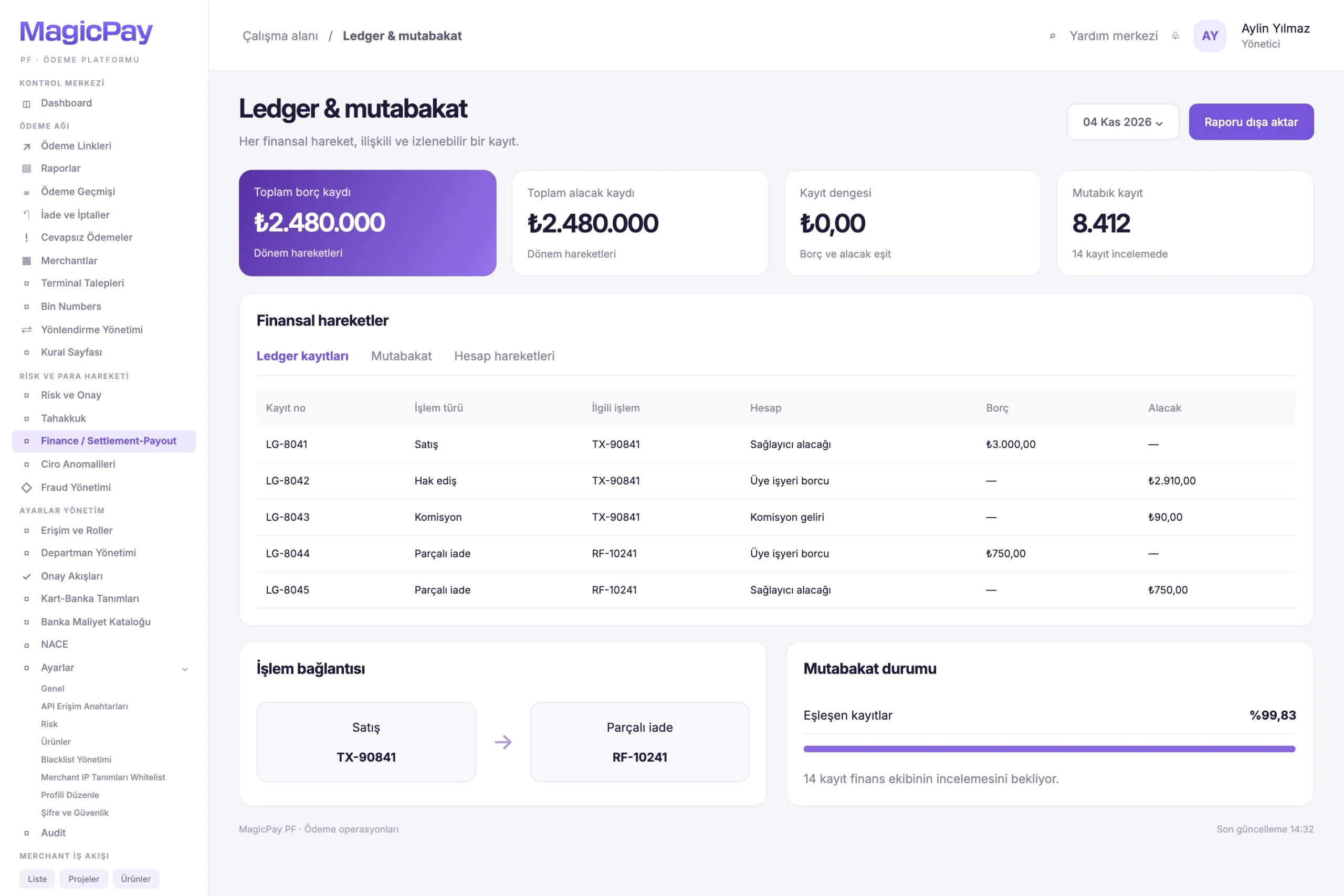
Ledger: trace every financial movement to its source

Ledger-based financial records connect sales, commissions, deductions, refunds, merchant settlement amounts and payouts. Review a sale's gross amount, deductions and net settlement amount together. Refunds and adjustments are recorded as new entries, preserving historical records for periodic review and reconciliation.

  • Record sales and payment receipts
  • Track commissions, deductions and partner shares separately
  • Record refunds and adjustments as new entries linked to the original sale
  • Trace settlement amounts, balances and payout movements
Sample panel showing debit and credit rows, a sale-refund link and reconciliation status. Open full-size image
Ledger and reconciliationFinancial movements and related transaction records with illustrative data.

Agent management: grow your merchant network on shared infrastructure

Keep applications, documents, products and commercial terms for merchants acquired through agents in one record. Complete activation after the required approvals, then continue tracking each merchant's transactions and revenue sharing through its agent relationship.

  • Manage agents and their associated merchants
  • Track applications, assessments and activation
  • Define commissions and revenue-sharing terms by product
  • Provide permission-based access to transaction and settlement information

Project-based management of your institution's integrator network

Organize your institution's payment services involving software companies and technology partners by project and merchant. These integrators participate in your institution's managed network, rather than purchasing or operating Payment OS independently. Set separate product and commission terms for different projects under the same integrator. Give your institution's operations teams a single management environment to see which integrator and project each merchant belongs to.

  • Manage integrator company and contact details
  • Link projects and merchants to their integrator
  • Define commissions by product and project, with revenue sharing based on agreements
  • Access payment and merchant workflows through the API

Multi-tier dealer management: one central view of your network

Centrally manage your institution's network of main dealers, sub-dealers and terminals. Track each dealer's products, commercial terms and payment receipts within its own scope. Your institution's central teams see the wider network while authorized users work with the records they are responsible for. Commission shares and payout recipients follow defined business rules.

  • Manage main dealer and sub-dealer relationships
  • Manage products and terminals by dealer
  • Set dealer-specific commissions and payout terms
  • Apply defined rules to payment receipts, payout recipients and record access

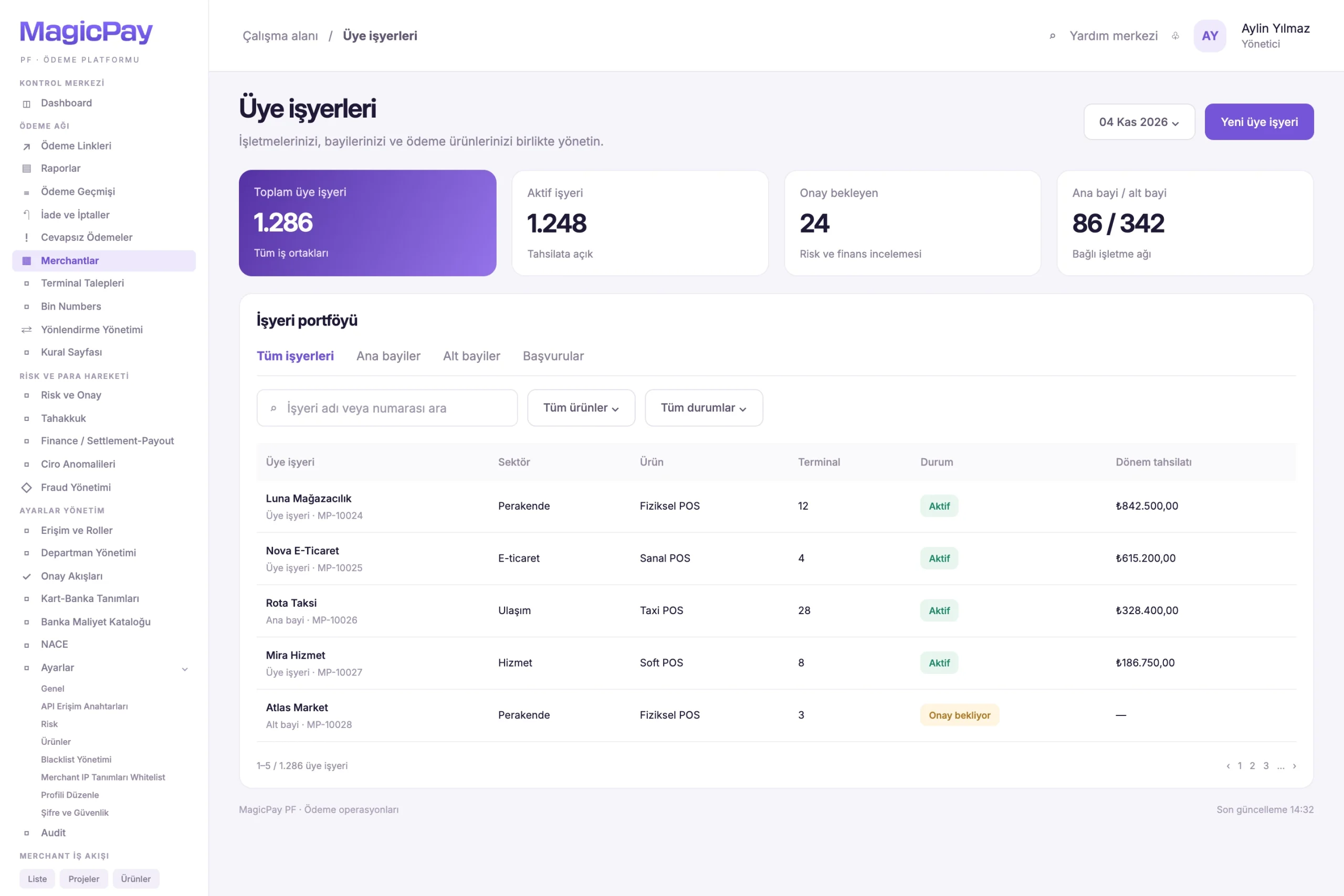
Digital applications and document management

Track merchant onboarding digitally, from initial information collection through activation. Link business details, authorized representatives and required documents to the same application. Give teams a shared view of completed records and applications awaiting information, documents or approval.

  • Record business and authorized representative details
  • Define document checklists by product and merchant type
  • Upload and review documents and resolve missing items
  • Track application, approval and activation statuses
Illustrative list with merchant search, product and status filters, and application tabs. Open full-size image
Merchants and applicationsPromotional view of the merchant portfolio and application statuses.

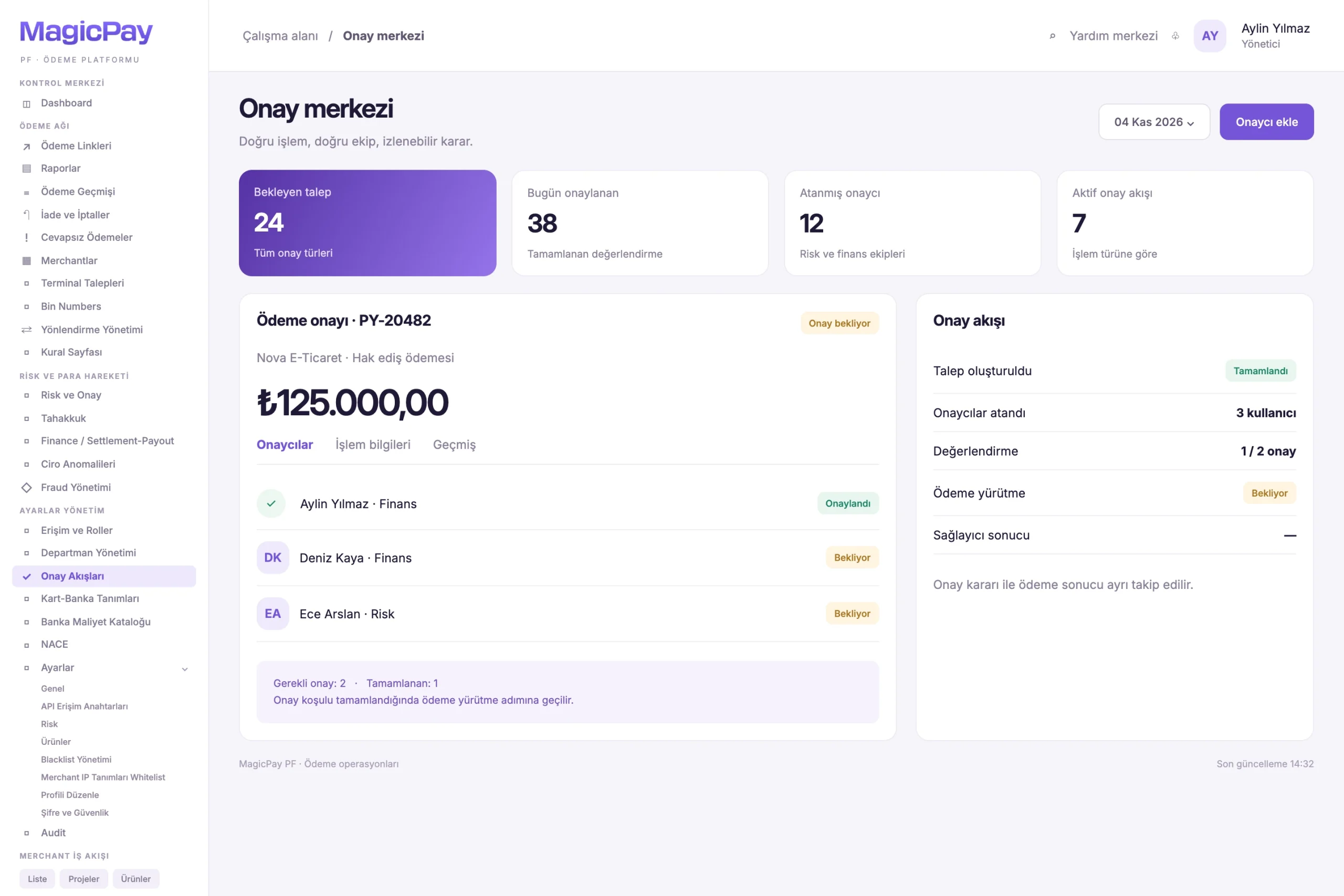
Controlled workflows with multiple approvers

Route processes that require approval, such as merchant onboarding, commercial term changes and financial transactions, to the relevant teams. Add multiple approvers to the same workflow and separate preparation from approval responsibilities. A process moves forward when its configured approval conditions are met. Internal approval and the financial transaction outcome at the bank or provider are tracked as separate statuses.

  • Assign multiple approvers to each workflow
  • Track pending, approved and rejected requests
  • Review approval decisions and transaction history
  • Advance processes according to defined approval rules
Sample payout request, assigned approvers and separate payout execution steps. Open full-size image
Multi-approver workflowsIllustrative workflow distinguishing internal approval from the payout result.

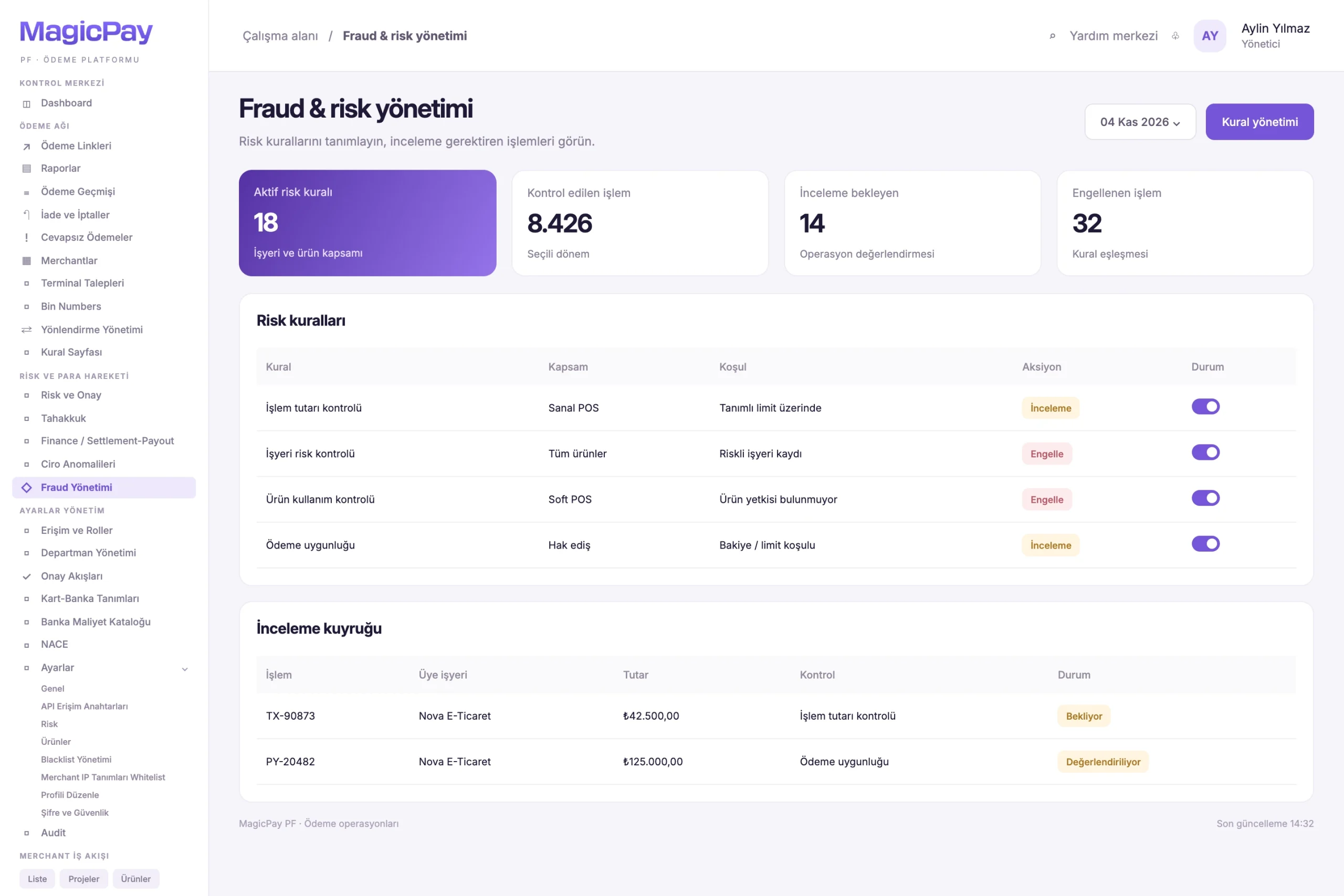
Fraud rules and risk controls

Manage risk rules by merchant and product. Assess transactions against amounts, limits and defined criteria, then link rule outcomes to allow, restrict or review actions. Risk teams can inspect a stopped transaction and the reason for the decision from the associated payment record.

  • Define risk conditions by merchant and product
  • Apply amount limits and defined transaction criteria
  • Trigger control actions based on the active rule set
  • Enable authorized teams to manage risk settings and track decisions
Risk rule, condition, action and status columns with a sample review queue. Open full-size image
Fraud rules and reviewsPromotional view of risk controls and review statuses.

Enable remote payments across your merchant network with payment links

Provide payment links through your institution's services for orders, services or remote sales in your merchant network, directing customers to a payment page. Check the payment status from the associated record and track link-initiated transactions in the same dashboard as your institution's other channels.

Manage commissions and commercial terms centrally

Define separate commercial terms for physical POS, virtual POS and other products. Manage rates by merchant, dealer, integrator and project to see how deductions, revenue shares and net settlement amounts are calculated. Changes requiring approval pass through the relevant control workflow.

  • Set product- and merchant-specific commission rates
  • Define commercial terms by integrator and project
  • Apply revenue sharing according to agreements
  • Track deductions, net settlement amounts and approvals for changes

Track voids from the original sale

Initiate a void request from the sale record. Payment OS considers the transaction status and the provider's void conditions before sending the request through the relevant connection. View the outcome and its effect on financial records within the same transaction chain.

  • Check void eligibility against the original sale
  • Send the request to the relevant provider
  • Track successful, failed and pending requests
  • Reflect the void outcome in financial records

Manage full and partial refunds together

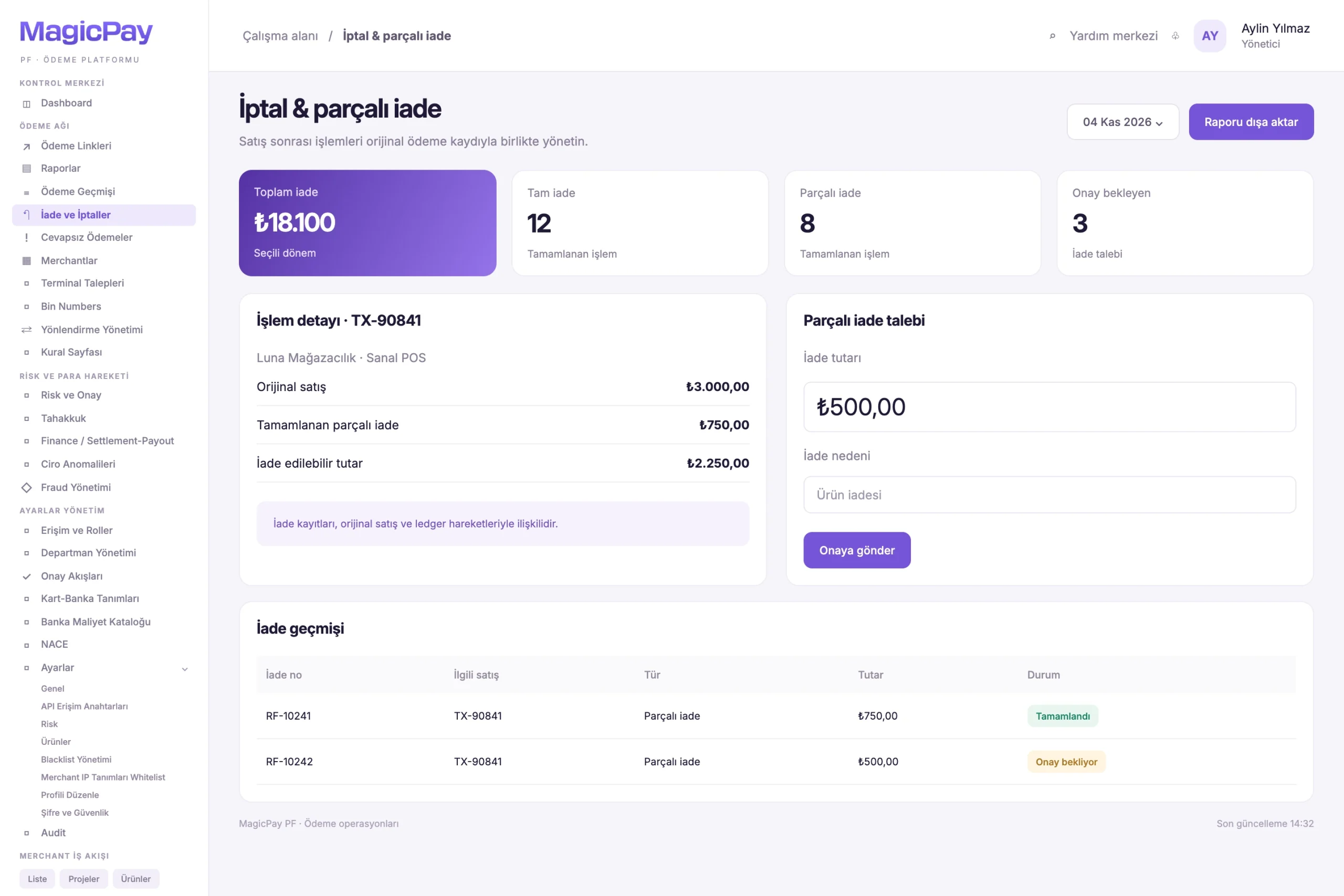
Refund all or part of a sale. Link every request to the original sale and track previous successful refunds, the remaining refundable amount and the effect on merchant settlement together. For example, a TRY 750 refund on a TRY 3,000 sale is linked to the sale as a separate financial entry. Subsequent requests are assessed against the remaining amount.

  • Initiate full and partial refunds
  • Check amounts against previous refunds
  • Issue multiple partial refunds where supported by the provider
  • Track each request's outcome and its effect on balances and settlement amounts
Original sale details, a partial refund request form and sample refund history. Open full-size image
Cancellation and partial refundsIllustrative view of sale-linked refund requests and the remaining amount.

Merchant settlement and payout management

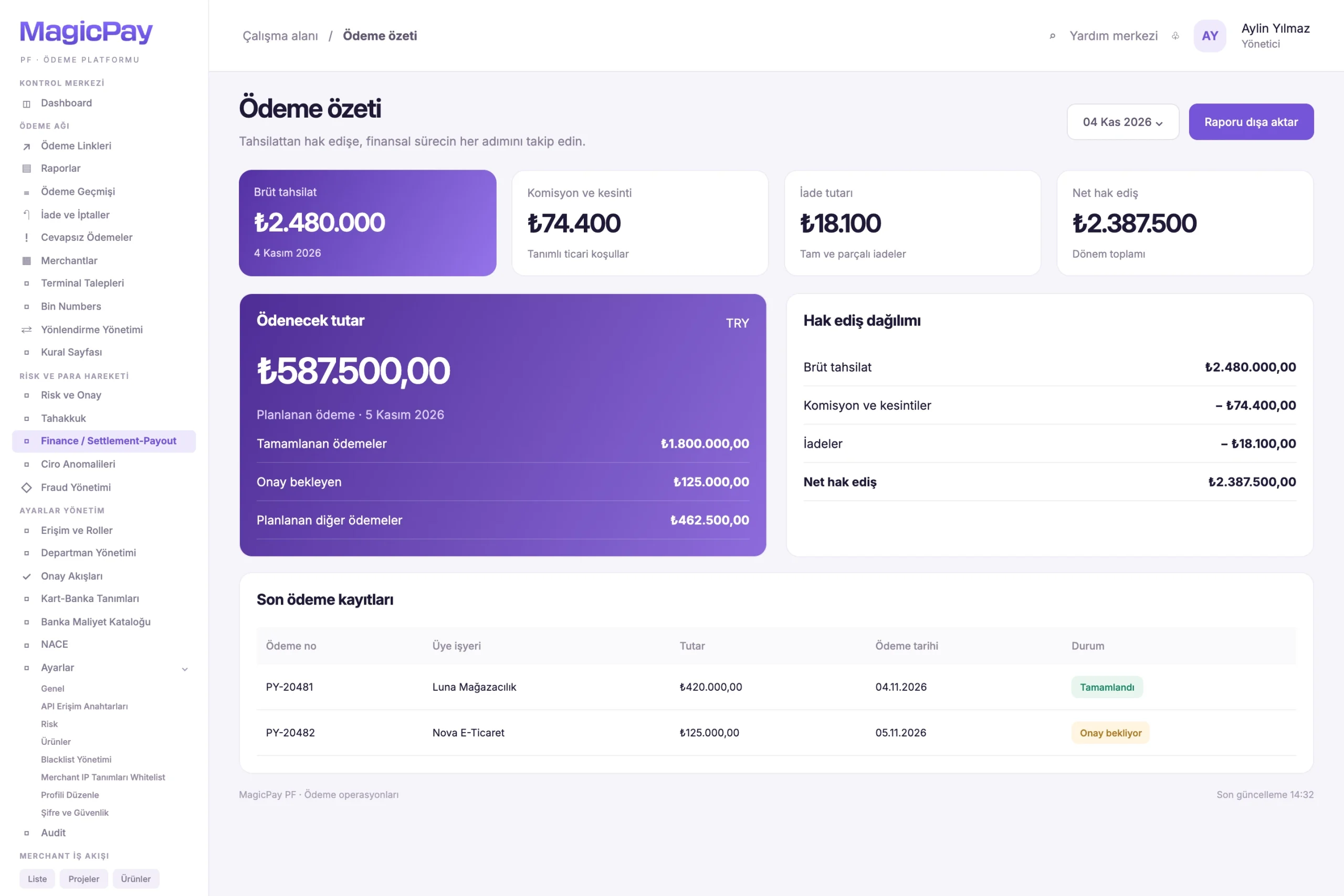
Track net merchant settlement amounts based on gross payment receipts, commissions, deductions and payout terms. View settlement timing and agreement terms alongside amounts payable, and track payout records for bank accounts or supported wallets. Separate payouts requiring review and route requests requiring approval through the relevant workflow.

  • Track gross payment receipts and net settlement amounts
  • Manage settlement timing and payout terms
  • Track payout records and outcomes, and identify failed requests
  • Track payouts to bank accounts or supported wallets
Gross collections, deductions, refunds and net settlement cards with sample payout records. Open full-size image
Settlement and payout summaryIllustrative financial summary from collections to settlement and payouts.

Preserve financial history after payout

Record refunds and adjustments received after a merchant payout as new financial movements. Preserve the historical payout record while tracking how each new movement affects the current balance and future settlement amounts. Assess pre-payout refunds against the amount payable, and post-payout refunds alongside the relevant sale and historical payout record.

Reconciliation: connect provider, transaction and ledger records

Compare provider records with platform transaction outcomes and ledger entries. Use shared references to investigate a sale's provider connection, deductions, refund status and relationship to merchant payouts. Isolate discrepancies so finance and operations teams can work from the same record.

  • Compare sale, void and refund records
  • Check gross amounts, commissions, deductions and net amounts
  • Review settlement amounts and completed payout records
  • Investigate discrepancies at transaction level

Reporting and a central management dashboard

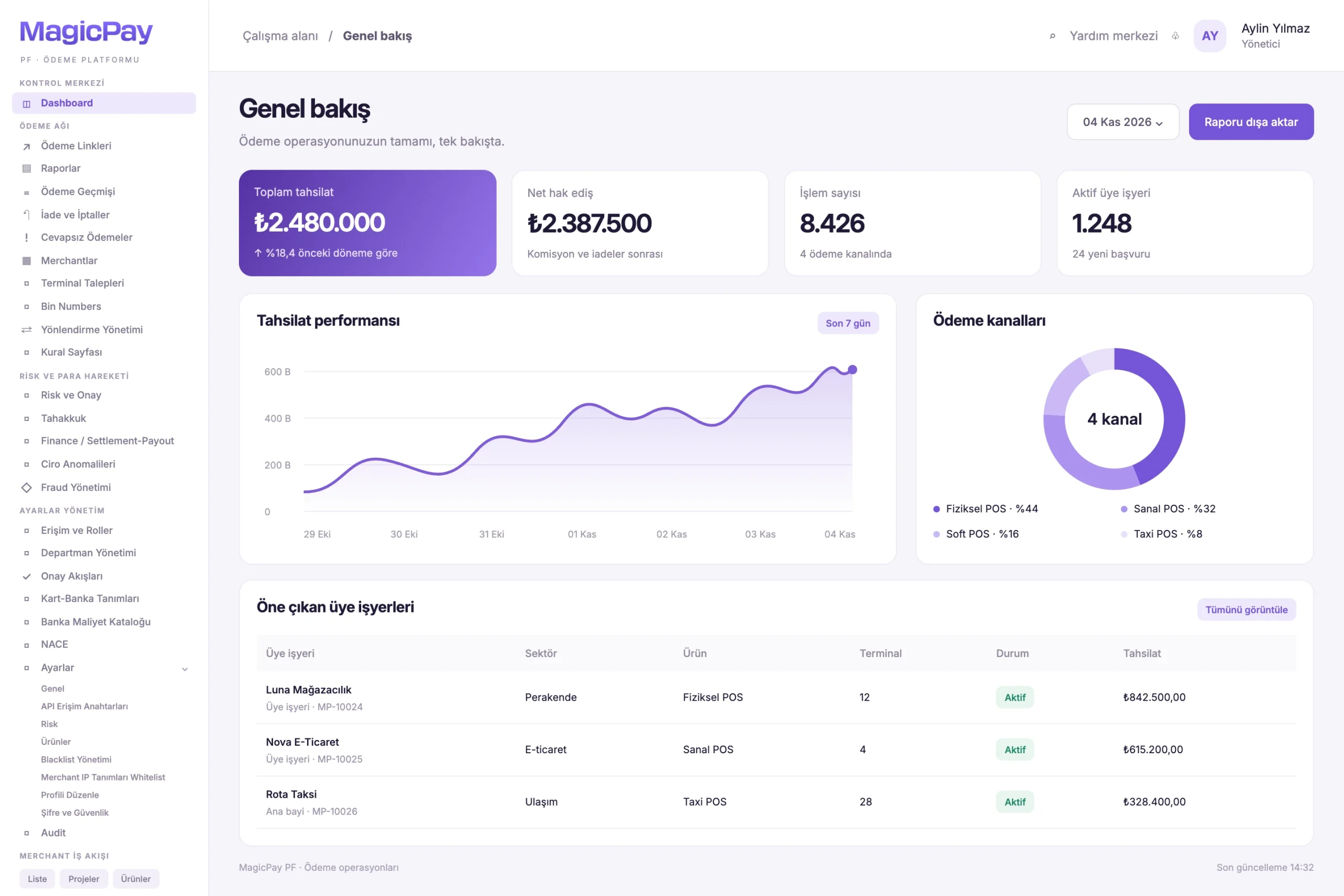
Access the records you need for daily checks and periodic reviews by date, product, dealer, terminal and transaction status. Review physical and virtual POS activity separately while tracking commissions, settlement amounts and payout information in the same management environment.

  • View sales and transaction lists
  • Track physical and virtual POS transactions separately
  • Filter by dealer, sub-dealer and terminal
  • View commissions, settlement amounts and payouts, with exports for supported reports
Promotional dashboard with a collections chart, payment channels and merchant table. Open full-size image
Central dashboardCollections and channel distribution with sample merchant records.

Align permissions and access with responsibilities

Give management, operations, finance and partner users access suited to their roles. Use roles and permissions to separate viewing, transaction creation and approval responsibilities. Across the dealer network and central operations, users work only with records and actions covered by their assigned permissions.

Who is Payment OS for?

Payment OS is offered exclusively to authorized payment institutions (PFs) in Türkiye, subject to CBRT/TCMB regulation and supervision under Law No. 6493 and MASAK obligations. It supports the institution's teams and its own managed merchant and partner network; network participants are not independent Payment OS purchasers or operators.

  • Institution merchant operations teams: physical POS, terminals and branch payments across their retail and service merchant network
  • Institution digital payment teams: virtual POS and payment links for their e-commerce merchant network
  • Institution mobile payment teams: Soft POS on compatible devices for field and mobile merchants in their network
  • Institution taxi network teams: vehicle registrations, terminals, payments and settlement amounts for their taxi merchant network
  • Institution partner teams: main dealers, sub-dealers, agents and associated merchants within their managed network
  • Institution integration teams: project-based payment integrations with software companies and integrators in their partner network
  • Institution finance and operations teams: ledger, reconciliation, merchant settlement and approvals
  • Institution risk teams: fraud rules, transaction controls and reviews

Use cases built around real operational workflows

Use your institution's platform across the sales channels and business partners in its managed network. Each scenario preserves the links between merchant, payment and financial records. The examples below illustrate institution-managed workflows, not measured customer results.

  • Review store and online sales together by channel, commission and payment outcome.
  • Onboard an agent-acquired merchant through document checks, product setup and activation.
  • Set separate product and commission terms for different projects under one integrator.
  • Link main dealer and sub-dealer payment receipts to commission shares and payout recipients.
  • Add approvers to the same process and track pending decisions and completed conditions.
  • Link a partial refund to the original sale and view the remaining refundable amount and effect on net settlement.
  • Match taxi payments to vehicle registrations and terminals, then track payout outcomes after deductions.

Set up your institution's payment operations in three steps

Connect your authorized Türkiye payment institution's merchant onboarding, network payment channels and finance teams in one operational workflow.

  • 1. Define your merchant, agent, integrator and dealer hierarchy, along with application and document workflows.
  • 2. Configure POS products, provider connections, routing rules, fraud controls and approval rules.
  • 3. Track sales, voids, refunds, commissions, merchant settlement amounts and payout outcomes alongside the ledger and reconciliation.

Payment OS provides technical infrastructure, not an operating license or regulatory compliance approval. Payment services, fund movements and MASAK obligations remain the authorized payment institution’s responsibility. Devices, installments, voids, refunds and payouts depend on its authorization, products, providers and agreements.

Related solutions and resources

Let's explore your institution's payment operations.

Discover Payment OS around your existing channels, merchant portfolio and financial workflows.

Request a Demo

Let's review your institution's use case and the relevant modules together.

FAQ

Frequently asked questions

Answers to clarify usage and integration scope.

Who is Payment OS for? +

Payment OS is offered directly and exclusively to authorized payment institutions (PFs) in Türkiye, subject to CBRT/TCMB regulation and supervision under Law No. 6493 and MASAK obligations. It serves the institution's teams and its own managed merchant, retailer, e-commerce, taxi, dealer, agent and integrator network. These participants use the institution's services and assigned access, rather than purchasing or operating Payment OS independently.

Is Payment OS just a payment gateway? +

Payment OS is end-to-end operational infrastructure. Alongside a gateway layer providing common access to banks and payment providers, it combines merchant applications, dealer and partner management, fraud controls, approval workflows, a ledger, merchant settlement and reconciliation.

Which payment channels can a merchant use together? +

Physical POS, virtual POS, Soft POS, Taxi POS and payment links can be managed together, subject to the merchant's configured products and usage terms. Transactions from every channel link to the same merchant record.

How does a ledger-based structure help finance teams? +

It lets teams track sales, commissions, deductions, refunds and payouts through linked records. Finance teams can review the movements that make up balances and settlement amounts while preserving historical records.

How does a process work with multiple approvers? +

Multiple approvers can be added to the same workflow, with request statuses and decisions tracked throughout. Each workflow's rules define the required number of approvals and approval conditions. Not every user has to approve every request.

How is internal approval separated from the financial transaction outcome? +

Internal approval shows that a request has passed your institution's control stage. The outcome of the transaction executed by the bank or payment provider is queried separately and tracked from the same operational record.

How is the remaining amount tracked for partial refunds? +

Each refund request links to the original sale. Previous successful refunds are deducted to check the remaining refundable amount. Multiple partial refunds can be issued against the same sale where the provider supports this flow.

How is a refund recorded after the merchant has been paid? +

The refund is recorded as a new financial movement linked to the original sale. The historical payout record is preserved, and defined rules determine how the refund affects the current balance and future settlement amounts.

How are fraud rules managed? +

Authorized teams define risk conditions and transaction limits by merchant and product. Transactions are assessed against the active rule set, and allow, restrict or review outcomes are tracked with the reasons for each decision.

How do agent and integrator workflows differ? +

Agent workflows focus on merchant acquisition and management of the associated business network. Integrator workflows cover connections between software projects and payment infrastructure, along with project-specific commercial relationships. Both are tracked through their associated merchants and revenue-sharing arrangements.

Which devices can be used for Soft POS? +

Mobile devices compatible with the relevant Soft POS solution can be used. Device and payment infrastructure compatibility are assessed alongside the product terms configured for the merchant.

Where can settlement amounts and payout timing be tracked? +

Settlement amounts, settlement timing, commissions, deductions and payout statuses are tracked in the central dashboard. Payout timing depends on the product, agreement, settlement schedule and relevant transaction checks.